Bambu Lab Colour Mixing Test: Incredible Idea… But the Waste Is Huge
16th Apr 2026 - by Andy Griffiths in 3D Printing Bambu Lab A1 Multimaterial
Testing Bambu Studio's new custom colour and gradient feature on the Bambu Lab A1 with AMS Lite.
Bambu Lab recently introduced a new custom colour mixing and gradient feature in Bambu Studio, allowing users to blend different filaments together to create entirely new colours directly within a print.
On paper, this is a fantastic idea. Instead of being limited to the colours of your filament spools, you can generate gradients, blends, and custom tones automatically during printing.
But how practical is it?
We decided to run a quick test using a Bambu Lab A1 with AMS Lite, printing a simple 20mm calibration cube using the new colour mix / gradient feature.
The results were interesting.
The Setup
For the test we used:
- Printer: Bambu Lab A1
- Multi-material system: AMS Lite
- Feature tested: Bambu Studio colour mixing / gradient
- Model: 20mm calibration cube
The idea was simple: print a very small object and see how the colour blending behaves and how efficient the process is.
The Print
Even for a tiny model, the printer reported:
- Print time: 3 hours 17 minutes
- Material used: 49g
For a 20mm cube, that's already quite surprising.
The long print time comes from the constant filament switching required to create the gradient effect.
Every colour transition requires the printer to purge filament before continuing.
The Result
From a purely visual standpoint, the feature works very well.
The cube shows a clean colour gradient between filaments, and the print quality is exactly what you'd expect from Bambu Lab printers.
Layer lines are consistent, edges are sharp, and the colour transition is smooth.
So technically, the feature does exactly what it promises.
But there's a catch.
The Real Cost: Purge Waste
To achieve colour blending, the printer has to constantly flush filament from the nozzle before switching colours.
That purge material quickly adds up.
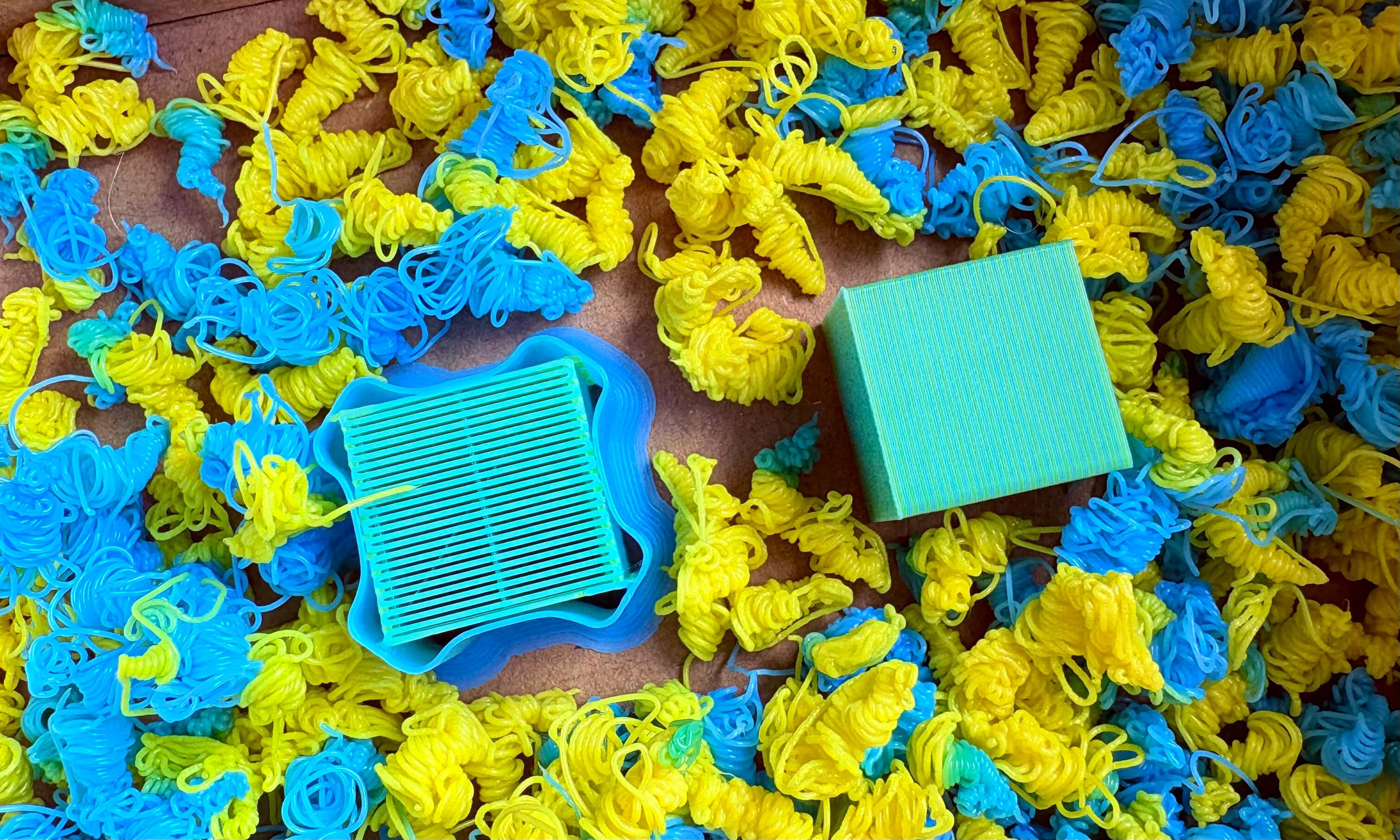
For our tiny 20mm cube, the amount of purge waste produced during the print was dramatically larger than the final object itself.
While the printer reported 49g of material used, a significant portion of that was simply discarded during colour changes.
For larger prints with more colour variation, this waste could increase substantially.
Is Bambu Lab Colour Mixing Practical?
The Bambu Studio colour mixing feature is genuinely impressive technology.
For:
- artistic prints
- display models
- experimental designs
- creative projects
...it opens up interesting possibilities.
However, from a commercial or production perspective, there are some clear limitations:
- significantly longer print times
- large amounts of purge waste
- inefficient material usage
For businesses or print farms producing parts at scale, this level of inefficiency makes the feature difficult to justify.
Final Thoughts
Bambu Lab's custom colour mixing and gradient system is an innovative feature that shows just how advanced consumer 3D printing has become.
It works, and the results look great.
But right now, it feels more like a creative novelty than a practical production tool.
For most real-world applications, single colour prints or traditional multi-colour prints remain far more efficient.
That said, it's exciting to see where features like this might go as multi-material printing continues to evolve.
Attribution
The colour prediction and gradient approach used in this test is closely related to work originally explored by @ratdoux in the OrcaSlicer-FullSpectrum project.
Further Reading
If you're interested in the technical details behind the feature, Bambu Lab has also documented the Color Mixing functionality in Bambu Studio in their official release notes.
According to Bambu Lab, the feature allows users to create custom colours by blending different filaments of the same material type, enabling gradients and colour transitions directly during printing.
You can read the full details in the official documentation here:
👉 https://wiki.bambulab.com/en/software/bambu-studio/release/release-note-2-5-3